







Narrow One
- Developer
- Pelican Party Studios
- Load Speed
- Fast (0–60 sec)
- Release Date
- Apr 2021
- Last Updated
- Play Mode
- Online Multiplayer
- Local Players
- 1 Player
- Controls
- Keyboard & Mouse, Touch Controls, Gamepad
- Perspective
- First-Person
What Is Narrow One?
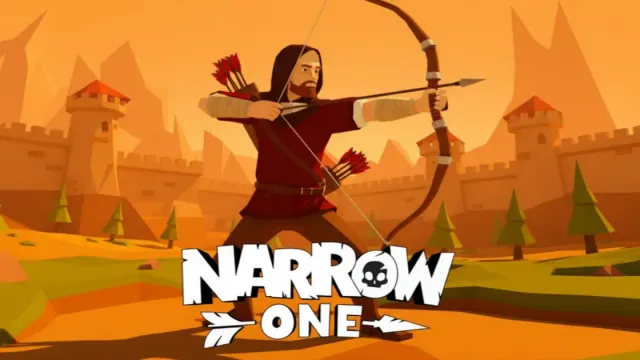
Narrow One replaces modern firearms with bows in a medieval multiplayer shooter. Work with teammates to defend your flag and bring the opposing flag back through maps built around towers, passages and alternate routes.
Game Screenshots
Bows, Routes and Flag Runs
Choose a bow that suits your preferred engagements and learn where each map offers cover or a shortcut. A direct route to the enemy base is not always the safest way back with the flag.
Melee weapons provide another option when fighting at close range. Their reach, speed and damage differ, so switching weapons changes how much space you need. Clothing and bow customization expand your loadout choices.
Game Controls
- W A S D: move
- Move Mouse: look and aim
- Left Click: hold to draw the bow, release to shoot
- Q: switch to melee
Touchscreen and gamepad controls are supported. Use the on-screen prompts for your device.
Flag Capture Tips
- Learn a return route before stealing the flag. Alternate paths can keep you away from the same entrances defenders are watching.
- Keep teammates within supporting distance. A flag carrier benefits from someone clearing the next passage rather than everyone chasing separate fights.
- Match the weapon to the space. Consider melee when an opponent gets too close for a comfortable bow shot.
Frequently Asked Questions
Can friends join the same match?
Yes. Use the squad feature to join together; private squads also provide map selection.
Can I change the crosshair?
Yes. Crosshair options include shape, color, outline and an accuracy offset.
Do I need to install a separate client?
No. The official game runs in a compatible browser. Touch and controller support are part of the browser version.
What should I do if the game won't load, lags, shows a blank screen, or won't start?
Try one of these four steps:
- Clear your browser cache, then reload the game.
- Open the game in an incognito or private browsing window.
- Try a different browser, such as Microsoft Edge or Google Chrome.
- On the game cover, click Primary in the top-right corner and select a different game source, if available.
What should I do if matchmaking stays on "Connecting" or the loading circle keeps spinning?
Matchmaking can take longer when fewer players are online or when servers are busy. A persistent "Connecting" message can also indicate a connection or server issue. Try these options:
- Recommended: on the game cover, use the source selector in the top-right corner (usually labeled Primary) to try another available game source. This may help if the current source is having connection issues, but different sources may share the same matchmaking servers. If no other source is available, try the options below.
- Browse Similar Games on this site and try a similar game while you wait.
- Choose a Single Player game that does not require matchmaking. PvE games may also be suitable, but check that they support solo play: a PvE tag alone does not guarantee single-player or offline play.




Leave a Comment
Comments (0)